Showing posts with label Computer Science. Show all posts

Network Security Concept

Network security is an important part of any network. It protects data when transmitting from one computer to another. Some terms related to network security are explained below:

Virus

A virus is a computer program that is made to harm our computer data, files, and other programs. Viruses can spread computers to computer and they can replicate themselves.

Antivirus

Antivirus is a computer program that used to find viruses in computers. Antivirus can disinfect virus-infected files and if it is not able to disinfect then it deleted the file. It is a very important program for every computer to make computers and networks more secure.

Spam

Spam is a mail or message that is sent to users without their approval. It can be sent by any organization to thousands or millions of people for promoting a particular product or service. It also can be a mail scam to get other people's money.

Cookies

A cookie is a small text file that any browser store to keep track of a user's activity on a specific website. It also used to identify the user or customize webpages according to the user's interests.

Firewall

A firewall is a network security device that monitors incoming and outgoing network traffic. It establishes a barrier between our internal network and incoming traffic from external sources (such as the internet) to block malicious traffic like viruses and hackers. A firewall can be either hardware and software.

HTTPS

HTTPS stands for HyperText Transfer Protocol Secure. It is a secure version of HTTP. It is a protocol for securing the communication between two systems e.g. the browser and the webserver. In HTTPS, the communication protocol is encrypted using Transport Layer Security (TLS) or, Secure Sockets Layer (SSL). 

Watch this video
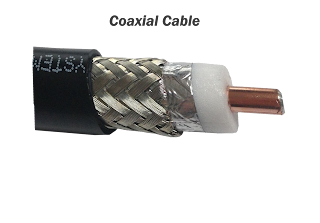
Coaxial Cable


Coaxial cable is the most commonly used transmission media for LANs.  It consists of solid wire cores surrounded by one or more foil or wire shields, each separated by some kind of plastic insulator. The inner core carries the signal and the shield provides the ground. It has high electrical properties and is suitable for high-speed communication it is widely used for television signals and also in building security systems.

Coaxial Cable, Thinnet, Thicknet, ICS Classes, Guided Media, Transmission Media
Coaxial Cable

Types of Coaxial Cable

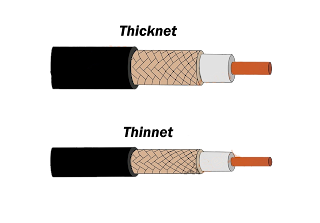
  1. Thicknet
  2. Thinnet

Thicknet

Its cable segment can be up to 500 meters.

Thinnet

This is thinner than Thicknet. Its cable segment can be up to 185 meters.

thinnet,thicknet,coaxial cable,icsclasses.blogspot.com, ICS Classes

Advantages of Coaxial Cable

  1. Data transmission characteristics are better than twisted pair cable.

  1.  It can be used for broadband communication.

  2.  It can be used for a shared cable network.

  3.  It offers a high bandwidth of up to 400 Mbps.


Disadvantages of Coaxial Cable

  1. It is expensive compared to twisted pair cables.

  2.  It is not compatible with twisted pair cable.


Introduction of Computer Network.

When two or more computers linked together for the purpose of sharing (sending/receiving) data and information, known as Computer Network.

Computer Network
Computer Network

Network Goals and Applications

  • Resource Sharing: The hardware devices like printers and scanners can be shared over a Network. This reduces costs by reducing the number of hardware items.
  • Storage Sharing: On a network, the user can access the data of another machine and can store data on another machine.
  • Reliability: A file can have copies on two or three different computers. So, if one is not available other copies can be used.
  • Access to a remote database: User can access the Host computer at his PC and send the request. For example - users can make flight reservations, book hotels, and so on anywhere in the world with instant confirmation.
  • Communication Facilities: Network provides us facilities to communicate with others via Emails, Chats, Video conferencing, and so on.

Disadvantages of Networking

  • Complex: Systems are more complex to run.
  • Server fails: If all data are held centrally in a server. It may create problems if the central server fails.
  • Expensive to install: Cables, Network devices, NIC, and Softwares required for installation of the network. And these are quite expensive.
We all know what Network is and what it can do. But the problem is how can we link computers to make a network? What structure should we follow to making a network? The solution to all these problems is Topology. Today in this blog we will know about Topology.

Network Topology

Before going deep in Topology we should know about Point-to-Point Link first.

point to point link-point to point link has two ends transmitter and receiver. the main characteristic of point to point link is that each transmitter transmits data to exactly one receiver and each receiver receives data from exactly one transmitter. In other words, we can say that it is two computer's link in which each computer can send or receive data directly from each other without any interruption of other computers.

Point to Point Link
Point to Point Link


The pattern in which computers/Nodes linked with a network known as Topology. Topology can be of 6 types-
  • Bus Topology
  • Star Topology
  • Mesh Topology
  • Ring Topology
  • Tree Topology
  • Graph Topology
You can also watch this video to know about Topology.


Let's explain all of this one by one 

Bus Topology Bus Topology is also known as Linear Topology. In this type of Topology each node attaches directly to a common cable which is known as the 'Backbone Network' when any computer wants to send data, all computers on the network receive the information but only one accepts the information. In this Topology, cable termination is required cable cannot be left unterminated.
Bus Topology
Bus Topology

Advantages:
  • Reliable, easy to use, and easy to install.
  • Additional nodes can easily connect to the existing network at any point.
Disadvantages:
  • Fault detection and isolation is difficult.
  • In any case, the failure of the Backbone Network can affect all devices in the network. 
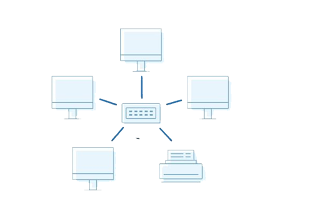
Star Topology: A Star Topology consists of devices connected by Point to Point link to a central Hub or Server. 1t
is easy to control and traffic flow is simple. Dala travels from the sender to the central hub and then to the receiver.
Advantages:
  • Single connection failure does not affect the entire network.
  • Fault detection is easier
  • It is easy to add a new node without disturbing the entire network.
Disadvantages:
  • If central Hub fails, the whole network fails.
  • Needed a large number of cables so, it increases installation charges.
Mesh Topology: In this Topology each node in network creating Point to Point link with all nodes.

Advantages:
  • Single connection failure does not affect the entire network.
  • Fault detection is easier
  • Every computer has multiple ways to transfer or receive data.
Disadvantages:
  • Difficult to add a new node.
  • Needed a large number of cables so, it increases installation charges.
Ring Topology: In this Topology, each node directly connected to two or only two neighbor computers. Data travels node to node only in one direction around the circle. That's why this Topology is also known as Circular Topology.
Advantages:
  • Reliable, easy to use, and easy to install.
  • Additional nodes can easily connect to the existing network at any point.
  • Less expensive
Disadvantages:
  • Fault detection and isolation is difficult.
  • The failure of any node of the network can affect all devices in the network. 
Tree Topology: This topology makes a tree in its structure that's why it is known as Tree Topology. This is a combination of Bus and Star topology. Many hubs directly connected to the Bus and computers directly connected to the hubs.
Advantages:
  • Error detection and correction is easy.
  • Additional nodes can be added easily.
Disadvantages:
  • When many segments added, Maintenance becomes difficult.
  • The failure of the backbone network can affect all devices in the network. 
Graph Topology: This Topology is a mixture of all topologies. In this topology, every node has many ways to send data to the other computers.